Production-Ready Data Ingestion: Avoiding Silent Corruptions in Vector DBs
Vector databases fail quietly. A traditional database throws a constraint violation when something is wrong. A vector database will happily embed garbled text, store a chunk missing half its sentence, or attach the wrong metadata to a document — and return confident-looking results forever, because cosine similarity doesn't know the difference between clean text and corrupted text. It just returns the nearest vector.
This is the core problem with retrieval-augmented generation (RAG) pipelines in production: the failure mode isn't a crash, it's a slow degradation of answer quality that's almost impossible to trace back to its source. By the time someone notices the chatbot is citing the wrong section of a policy document, the corruption happened weeks earlier, at ingestion time.
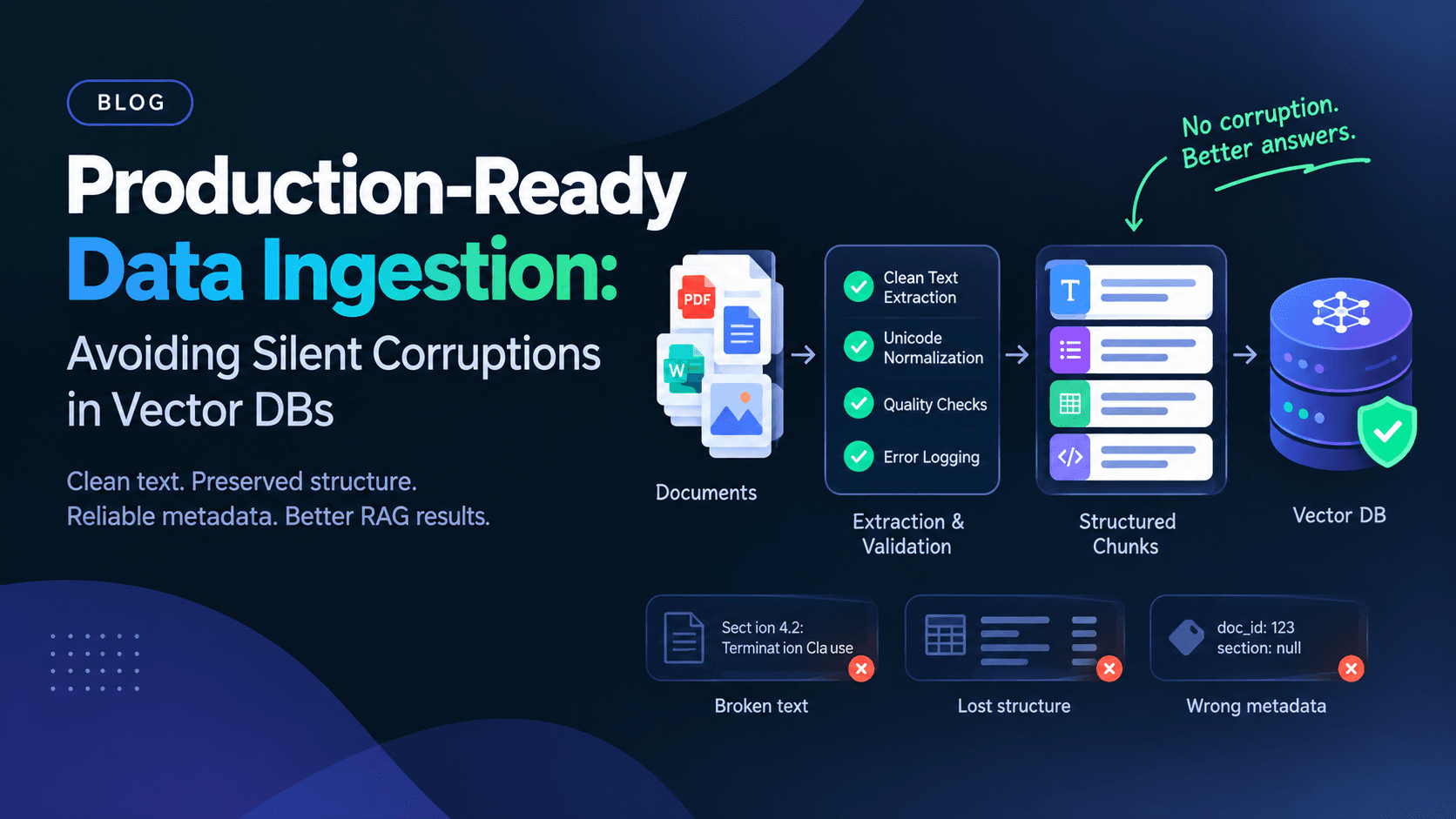
This guide is a tactical walkthrough of the three places silent corruption enters a pipeline — text extraction, structural hierarchy, and metadata — with practical fixes for storage systems like Chroma.
Why Vector DB Corruption Is "Silent"
In a relational database, a malformed row usually fails a schema check. In a vector store, every chunk of text — no matter how mangled — produces a valid embedding vector. The database has no way to know that "Sect ion 4.2: Terminat ion Cla use" is a broken OCR extraction rather than legitimate content. It just stores the vector and indexes it.
That means data quality problems in vector search systems don't surface as errors — they surface as degraded relevance, hallucinated citations, and support tickets that say "the bot gave a weird answer" with no obvious root cause. Debugging this after the fact is far more expensive than preventing it at ingestion.
Stage 1: Extracting Clean Text
Almost all silent corruption starts here. Source documents — PDFs, HTML pages, Word docs, scanned images — were never designed to be machine-readable in the way a chunking pipeline assumes.
The Most Common Extraction Failures
- Broken PDF text layers: PDFs generated from scanned images or exported from design tools often store text in a non-reading order. Extracting "as-is" produces columns interleaved mid-sentence.
- Encoding mismatches: Documents saved in Latin-1, Windows-1252, or with inconsistent Unicode normalization can introduce mojibake (
"café"becoming"café") that embeds as noise. - Boilerplate contamination: Headers, footers, page numbers, and navigation menus scraped from HTML get embedded as if they were content, diluting the semantic signal of every chunk they touch.
- Whitespace and hyphenation artifacts: PDF line-wrap hyphens (
"informa-\ntion") that aren't rejoined during extraction corrupt individual words.
Fixes That Actually Hold Up in Production
- Use extraction libraries built for structure, not just text dumps. Tools like Unstructured partition documents into typed elements (titles, narrative text, tables, lists) rather than returning one undifferentiated string, which makes downstream boilerplate filtering far easier.
- Normalize Unicode explicitly. Run every extracted string through Unicode Normalization Form C (NFC) before embedding, so visually identical characters with different byte representations don't fragment your semantic space.
- Validate before you embed. Add a validation step that checks for minimum content length, printable-character ratio, and language detection confidence before a chunk is allowed into the pipeline. A chunk that's 40% non-printable characters should be flagged, not silently embedded.
- Log extraction failures loudly. If a PDF page fails OCR or a parser throws a partial-content warning, that should be a pipeline event you can query later — not a swallowed exception. This is the same principle behind debugging malformed JSON payloads: the earlier you can pinpoint exactly where a parse broke down, the cheaper the fix. This step-by-step guide to debugging JSON parse errors is a good model for the kind of precise, line-level error tracing that ingestion pipelines should apply to document parsing failures too.
Stage 2: Preserving Hierarchy During Chunking
Clean text extraction solves half the problem. The other half is chunking — and this is where most RAG pipelines quietly destroy the structure that made the original document useful.
Why Naive Chunking Corrupts Meaning
A fixed-size character or token splitter (e.g., "split every 500 tokens") has no concept of where a section ends. It will:
- Split a numbered list in half, so retrieved chunks reference "item 3" with no visible items 1 and 2
- Separate a table's header row from its data rows
- Cut a heading off from the paragraph it introduces, so the retrieved chunk has no topical anchor
- Break a legal clause mid-sentence, changing its meaning if read in isolation
None of this throws an error. It just produces chunks that retrieve well on keyword overlap but read as nonsense — or worse, as confidently wrong — to the language model consuming them.
Structure-Aware Chunking Strategies
- Split on document structure first, size second. Use header-aware splitters — such as LangChain's
MarkdownHeaderTextSplitteror HTML-section-aware splitters — so chunks respect section boundaries before any size-based splitting is applied. - Keep tables intact or don't chunk them at all. Tables often carry meaning that depends entirely on row-column relationships. Consider extracting tables as a separate content type with their own summarization or serialization strategy rather than forcing them through the same text splitter as prose.
- Attach hierarchical context to every chunk. A chunk shouldn't just contain its own text — it should carry the section and subsection titles it belongs to, either prepended to the chunk content or stored as metadata, so a retrieved chunk is interpretable without its neighbors.
- Use overlap deliberately, not by default. A small overlap window (10–15%) between adjacent chunks helps preserve context across a split, but excessive overlap inflates storage and can cause near-duplicate chunks to dominate retrieval results.
- Test chunk boundaries against real queries. Before shipping a chunking strategy, manually inspect what a dozen representative queries actually retrieve. If retrieved chunks frequently start or end mid-sentence, your boundaries are wrong regardless of what your token counter says.
If you're building this pipeline for the first time, a structured walkthrough of the moving parts — chunking, embedding, indexing, and grounded generation — is worth reviewing end-to-end; this hands-on guide to building a RAG pipeline with Qdrant covers the same ingestion stages discussed here, applied to a working vector store implementation.
Stage 3: Handling Metadata Without Corrupting It
Metadata is where silent corruption becomes hardest to detect, because a metadata bug doesn't degrade a single chunk's content — it silently breaks filtering, access control, or citation accuracy across the entire collection.
Common Metadata Failure Modes
- Inconsistent schemas across ingestion runs: one batch stores
source_url, another storesurl, and filters silently return incomplete results with no error. - Stale metadata after re-ingestion: a document is updated, but the old chunks with outdated metadata (wrong version, wrong effective date) are never removed from the collection.
- Type drift: a field stored as a string (
"2026-09-07") in one batch and a Unix timestamp in another, breaking range queries without any indication. - Missing provenance: no record of which source document, page, or version a chunk came from, making it impossible to debug a bad retrieval or honor a content deletion request.
Metadata Practices for Chroma and Similar Stores
- Define an explicit metadata schema before ingestion, not after. Treat it the way you'd treat an API contract — document required fields, types, and allowed values, ideally validated with a JSON Schema definition that runs before any chunk is added to the collection.
- Use stable, deterministic IDs. Chroma's
addandupsertmethods behave very differently depending on whether an ID already exists. Generate chunk IDs deterministically (e.g., a hash ofsource_id + chunk_index + content_hash) so re-ingesting an unchanged document doesn't create duplicates, and re-ingesting a changed one correctly upserts rather than appends. - Store a content hash in metadata. Comparing the current document's content hash against the hash stored at ingestion time is the simplest way to detect whether a source has changed and needs re-embedding — without re-embedding everything on every pipeline run.
- Version your embeddings alongside your metadata. If you change embedding models, store the model name and version as metadata on each chunk. Mixing vectors from two different embedding models in the same collection without tracking which is which will silently degrade similarity search, since distances between vectors from different models aren't meaningfully comparable. Refer to your embedding provider's documentation — for example, OpenAI's embeddings guide — for model-specific dimensionality and versioning notes before mixing model outputs.
- Implement deletion propagation. When a source document is deleted or superseded, make sure the ingestion pipeline removes the corresponding chunks from the vector store. Chroma supports deletion by ID or by metadata filter through
collection.delete()— build this into your pipeline as a required step, not a manual cleanup task. - Validate metadata filters against real query patterns. If your application filters by
departmentordocument_type, write automated tests that assert those filters return the expected chunk counts after every ingestion run, so a schema drift is caught in CI rather than in production.
Building an Ingestion Pipeline That Fails Loudly
The recurring theme across all three stages is the same: corruption goes undetected because vector databases don't validate semantic correctness, only vector shape. The fix is to move validation earlier in the pipeline, where failures are cheap to catch, rather than relying on the vector store to catch anything.
A production-ready ingestion pipeline should include:
- Pre-embedding validation: content length, character encoding, language confidence, and boilerplate ratio checks
- Structural validation: confirming that chunks retain heading context and that tables aren't split mid-row
- Schema validation: enforcing a strict metadata contract before any chunk is written to the collection
- Idempotency checks: content hashing to prevent duplicate or stale chunks from accumulating over repeated ingestion runs
- Observability: logging extraction failures, chunk counts, and metadata schema violations as first-class pipeline events, not silent exceptions
Long-running ingestion jobs also deserve the same operational scrutiny as any other production service. Batch processing large document sets can introduce its own failure modes — unbounded memory growth from accumulating parsed documents in memory being one of the more common ones. The debugging approach in this breakdown of a Node.js memory leak — tracing where references are held longer than expected — applies directly to ingestion workers that process large batches of documents without releasing intermediate parsing artifacts.
Conclusion
Vector databases will never tell you your data is corrupted — they will only ever tell you what's nearest to a query vector, regardless of whether that vector represents real content, a broken PDF extraction, or a chunk with the wrong metadata attached. The only reliable defense is treating ingestion as the place where correctness is enforced: clean, validated text extraction; chunking that respects document structure instead of arbitrary size limits; and a metadata schema that's versioned, validated, and kept in sync with the source documents it describes. Get those three stages right, and retrieval quality stops being a mystery you debug after the fact.