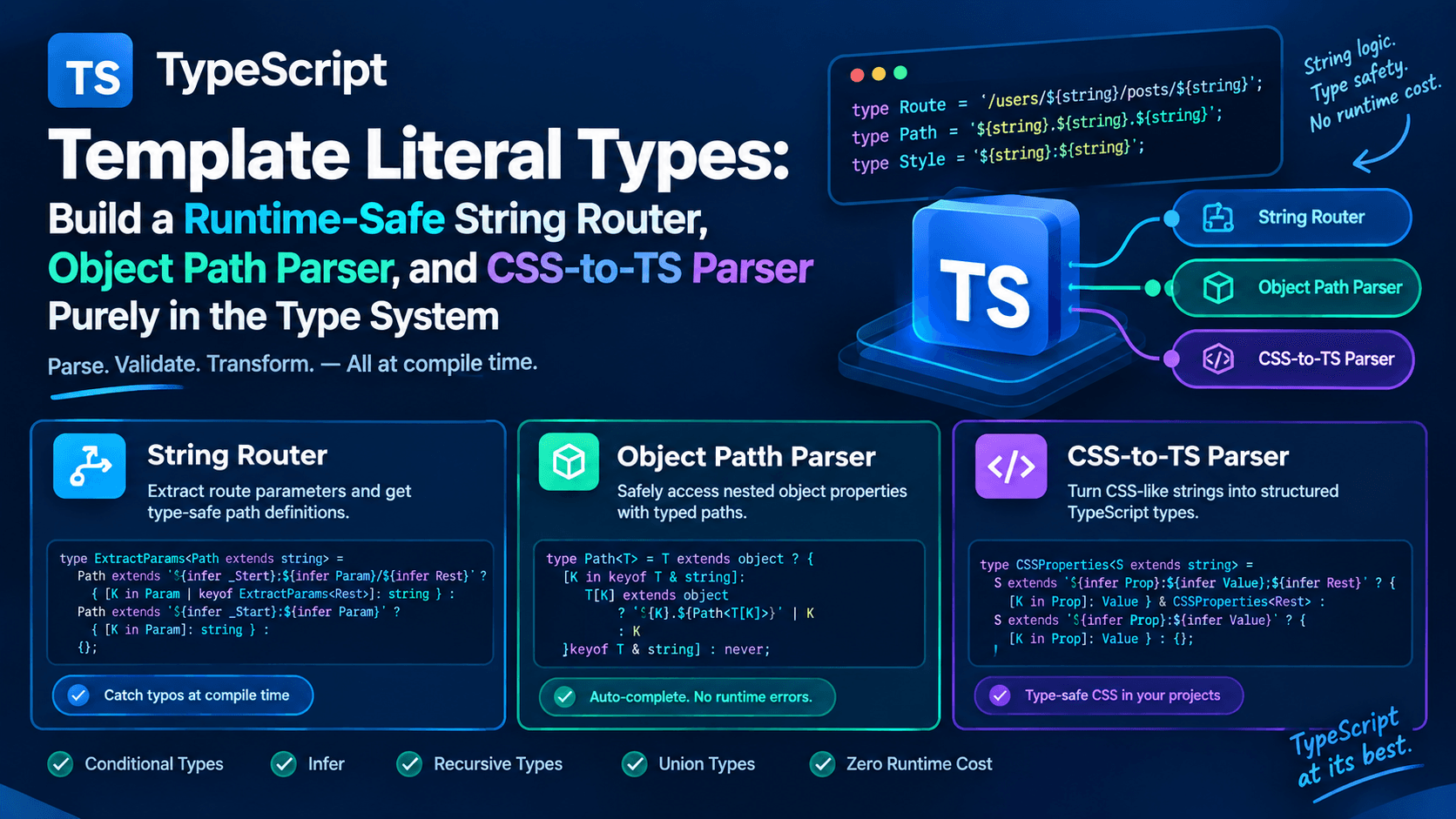
Template Literal Types: Building a Runtime-Safe String Router, Object Path Parser, and CSS-to-TS Parser Purely in the Type System
TypeScript's type system stopped being "just a type checker" a while ago. With the introduction of template literal types in TypeScript 4.1, the compiler gained the ability to manipulate, parse, and generate string types the same way JavaScript manipulates runtime strings — except all of it happens at compile time, with zero runtime cost.
This unlocks a category of tooling that used to require either runtime validation libraries or code generation scripts: type-safe routers, type-safe object path accessors (get(obj, "a.b.c")), and even parsers that turn CSS-like strings into structured TypeScript types. In this article, we'll build all three, explain the underlying mechanics (conditional types, infer, recursive type aliases), and talk about where this technique should — and shouldn't — be used in production.
What Template Literal Types Actually Are
A template literal type looks like a JavaScript template literal, but instead of interpolating values, it interpolates types:
typescript
type Greeting = `Hello, ${string}`;

const a: Greeting = "Hello, world"; // ✅
const b: Greeting = "Hi there";     // ❌ Type error
When you combine template literal types with union types, TypeScript performs a distributive expansion, generating every possible combination:
typescript
type Size = "small" | "medium" | "large";
type Color = "red" | "blue";

type Variant = `${Size}-${Color}`;
// "small-red" | "small-blue" | "medium-red" | "medium-blue" | "large-red" | "large-blue"
This is the foundation. But the real power comes from pairing template literal types with conditional types and the infer keyword, which lets you pattern-match on a string type and extract pieces of it — effectively writing a parser that runs entirely inside the compiler.
According to the TypeScript Handbook's section on Template Literal Types, these types are most useful "when combined with the rest of the type system to describe intent," which is exactly what we're going to lean on for the three tools below.
Tool 1: A Runtime-Safe String Router
Most routing libraries validate paths and params at runtime — if you typo a param name, you find out when the request hits the server. We can catch this at compile time instead.
Step 1: Extract path parameters from a route string
We want ExtractParams<"/users/:id/posts/:postId"> to produce { id: string; postId: string }.
typescript
type ExtractParams<Path extends string> =
  Path extends `${infer _Start}:${infer Param}/${infer Rest}`
    ? { [K in Param | keyof ExtractParams<Rest>]: string }
    : Path extends `${infer _Start}:${infer Param}`
      ? { [K in Param]: string }
      : {};
Let's break this down:
- The first branch matches any segment containing
:paramName/followed by more path — it capturesParamand recurses onRestto catch every remaining parameter. - The second branch handles the terminal parameter (no trailing slash).
- If neither pattern matches, we return an empty object — no params found.
Step 2: Build a type-safe route matcher
typescript
type Route<Path extends string> = {
  path: Path;
  params: ExtractParams<Path>;
};

function defineRoute<Path extends string>(path: Path): Route<Path> {
  return { path, params: {} as ExtractParams<Path> };
}

const userRoute = defineRoute("/users/:id/posts/:postId");
// userRoute.params is inferred as { id: string; postId: string }
Step 3: Enforce params at call sites
typescript
function navigate<Path extends string>(
  route: Route<Path>,
  params: ExtractParams<Path>
) {
  let url: string = route.path;
  for (const key in params) {
    url = url.replace(`:${key}`, (params as Record<string, string>)[key]);
  }
  return url;
}

navigate(userRoute, { id: "42", postId: "7" }); // ✅
navigate(userRoute, { id: "42" });               // ❌ Property 'postId' is missing
Now a missing or misspelled route parameter is a compile-time error, not a 404 discovered in production. This pattern is the basis for how several modern typed routers (and typed API-client generators) infer their param shapes — the parsing logic never touches RegExp; it's pure conditional-type recursion.
Tool 2: A Type-Safe Object Path Parser (get/set with Autocomplete)
A common utility is a lodash-style get(obj, "a.b.c"). Doing this safely means the type system needs to:
- Enumerate every valid dot-path string for a given object shape.
- Resolve the return type at the end of that path.
Step 1: Generate all valid paths
typescript
type Primitive = string | number | boolean | bigint | symbol | undefined | null;

type Paths<T, Prev extends string = ""> = T extends Primitive
  ? never
  : {
      [K in keyof T & string]: T[K] extends Primitive
        ? `${Prev}${K}`
        : `${Prev}${K}` | Paths<T[K], `${Prev}${K}.`>;
    }[keyof T & string];
This recursively walks the object shape. At each key, if the value is a primitive, we stop and emit the path as-is. Otherwise, we emit the current path and recurse deeper, accumulating the prefix (Prev) along the way.
typescript
interface User {
  id: number;
  profile: {
    name: string;
    address: {
      city: string;
      zip: string;
    };
  };
}

type UserPaths = Paths<User>;
// "id" | "profile" | "profile.name" | "profile.address" | "profile.address.city" | "profile.address.zip"
Step 2: Resolve the value type at a given path
typescript
type PathValue<T, P extends string> = P extends `${infer Key}.${infer Rest}`
  ? Key extends keyof T
    ? PathValue<T[Key], Rest>
    : never
  : P extends keyof T
    ? T[P]
    : never;
Here, infer Key and infer Rest split the path on the first dot, recursing until there's no dot left — at which point we index directly into T.
Step 3: A fully type-checked get function
typescript
function get<T, P extends Paths<T>>(obj: T, path: P): PathValue<T, P> {
  return path.split(".").reduce((acc: any, key) => acc?.[key], obj);
}

const user: User = {
  id: 1,
  profile: { name: "Ada", address: { city: "London", zip: "SW1" } },
};

const city = get(user, "profile.address.city"); // type: string, autocompletes!
const bad = get(user, "profile.addr");           // ❌ Argument not assignable
Your editor will now autocomplete every valid path as you type the string literal, and any typo is rejected before you ever run the code. This is the same core mechanism used by strongly-typed form libraries and state-management selectors that accept dot-paths as strings.
Tool 3: A CSS-to-TypeScript Parser
This is the most ambitious of the three: parsing a CSS-like string into a structured object type, entirely via template literal types. Think of this as the type-level equivalent of a tiny CSS tokenizer.
Step 1: Split declarations on semicolons
typescript
type SplitDeclarations<S extends string> =
  S extends `${infer Head};${infer Tail}`
    ? [Head, ...SplitDeclarations<Tail>]
    : S extends ""
      ? []
      : [S];
Given "color: red; font-size: 12px;", this recursively peels off each declaration into a tuple: ["color: red", " font-size: 12px", ""] (trailing empty strings get filtered in the next step).
Step 2: Parse a single property: value pair
typescript
type Trim<S extends string> = S extends ` ${infer Rest}`
  ? Trim<Rest>
  : S extends `${infer Rest} `
    ? Trim<Rest>
    : S;

type ParseDeclaration<S extends string> =
  Trim<S> extends `${infer Prop}:${infer Value}`
    ? { [K in Trim<Prop>]: Trim<Value> }
    : {};
Trim strips leading/trailing whitespace recursively (there's no native .trim() for types, so we pattern-match spaces off both ends). ParseDeclaration then splits on the colon and trims each side.
Step 3: Merge everything into one object type
typescript
type ParseCSS<S extends string> = SplitDeclarations<S> extends infer Decls
  ? Decls extends string[]
    ? UnionToIntersection
        { [I in keyof Decls]: Decls[I] extends "" ? {} : ParseDeclaration<Decls[I]> }[number]
      >
    : never
  : never;

type UnionToIntersection<U> =
  (U extends any ? (x: U) => void : never) extends (x: infer I) => void ? I : never;
UnionToIntersection is a well-known utility pattern that flips a union of object types into an intersection, effectively merging them into a single shape.
typescript
type Style = ParseCSS<"color: red; font-size: 12px; display: flex;">;
// {
//   color: "red";
//   "font-size": "12px";
//   display: "flex";
// }
You can pair this with a function signature to build a css tag function whose return type is inferred directly from the string you pass in — useful for style-object validation, design-token enforcement, or generating typed CSS-in-JS props without any runtime parsing step.
typescript
function css<S extends string>(style: S): ParseCSS<S> {
  return Object.fromEntries(
    style.split(";").filter(Boolean).map((d) => d.split(":").map((s) => s.trim()))
  ) as ParseCSS<S>;
}

const s = css("color: red; font-size: 12px;");
s.color; // type: "red"
Why This Works: The Three Ingredients
All three tools rest on the same three type-system primitives, documented in the official TypeScript Handbook:
- Template literal types for pattern construction — see Template Literal Types.
- Conditional types for branching logic based on whether a string matches a pattern — see Conditional Types.
- The
inferkeyword for capturing a sub-part of a matched string into a new type variable, documented in the same conditional-types page under "Inferring Within Conditional Types." - Mapped types to reshape captured keys into object types — see Mapped Types.
Once you can combine "match a pattern," "capture a fragment," and "recurse on the remainder," you effectively have a small parser combinator library that runs inside tsc.
Limitations and When Not to Do This
Type-level parsing is powerful, but it's worth being honest about its constraints:
- No runtime guarantees. These types constrain what compiles; they do not validate values received from the network, a database, or user input. You still need runtime validation (e.g., a schema library) at your application's trust boundary.
- Recursion limits. TypeScript enforces a maximum type instantiation depth. Extremely long strings (very deeply nested object paths or very long CSS strings) can hit
Type instantiation is excessively deeperrors. - Compiler performance. Heavy recursive conditional types increase type-checking time. For large codebases, measure the impact on
tsc --noEmitbuild times before shipping this pattern broadly. - Readability trade-off. Recursive template literal types are dense. Keep them isolated in a small
types/module with comments, rather than inlining them throughout a codebase — future maintainers (including future you) will thank you.
Best Practices for Production Use
- Isolate parsing types in a dedicated file (
path-types.ts,route-types.ts) so they're easy to test and document independently of business logic. - Pair type-level parsing with a matching runtime implementation. The type tells the compiler what's valid; the runtime function should mirror that logic exactly, or the two will drift.
- Write type-only unit tests. Tools like
tsdorexpect-typelet you assert thatPaths<User>resolves to the exact union you expect, catching regressions in your recursive types the same way you'd test runtime code. - Cap recursion depth deliberately for user-facing generic utilities, so a pathological input string fails with a clear TypeScript error rather than a compiler timeout.
Conclusion
Template literal types turn TypeScript's type checker into a genuine string-processing engine. By combining template literals, conditional types, and infer, you can build a route parameter extractor, a fully autocompleted object path accessor, or a CSS declaration parser — all without writing a single line of runtime parsing code for the types themselves. The runtime implementation still needs to exist, but the compiler now guarantees it's being called correctly, catching an entire class of stringly-typed bugs before your code ever runs.
Used judiciously — isolated, documented, and paired with real runtime validation — this is one of the most practical advanced features TypeScript offers for building safer developer tooling.