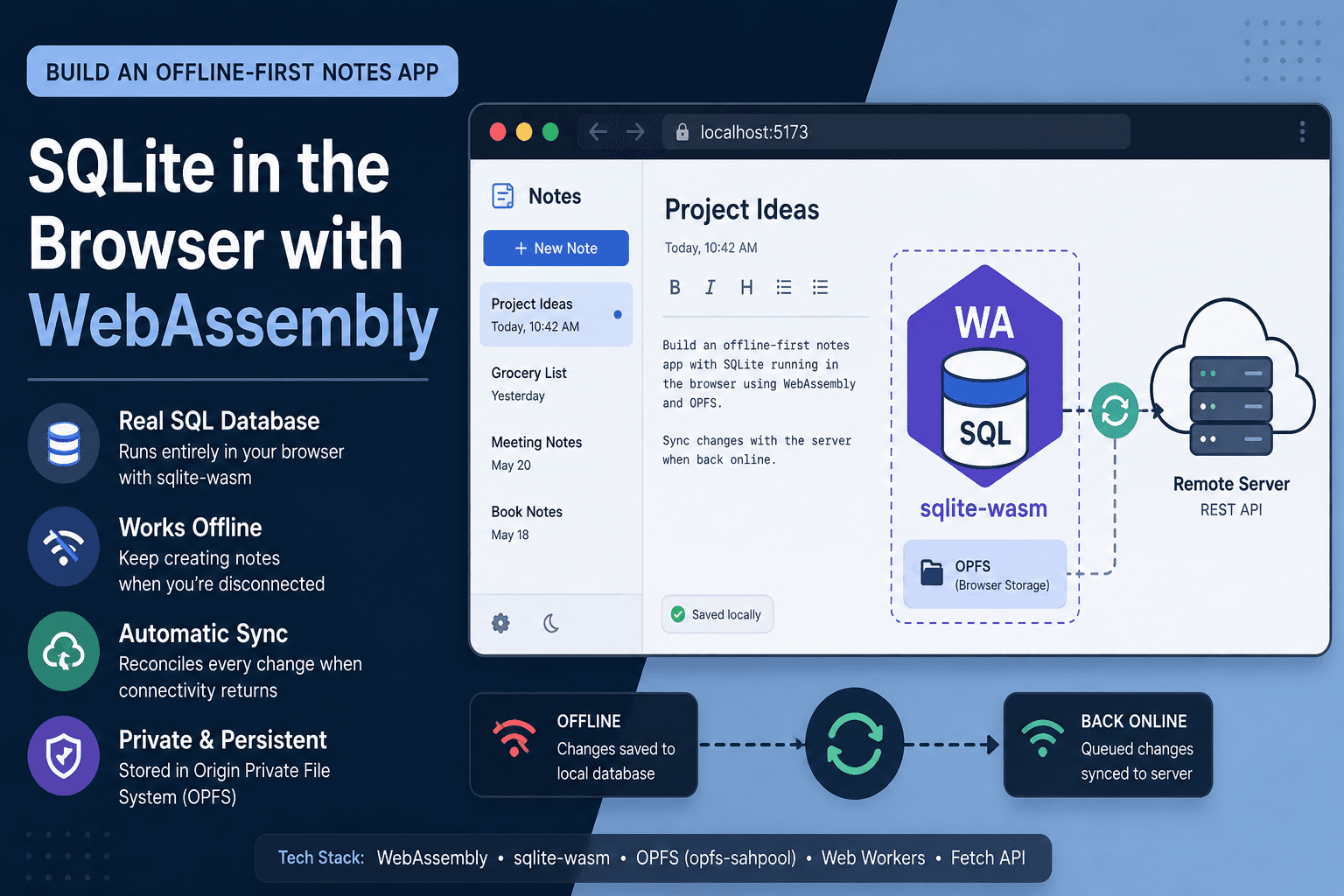
By the end of this tutorial, you'll have a notes app that runs an actual SQL database inside the browser tab, keeps working with the network switched off entirely, and reconciles every offline write against a server the moment connectivity comes back. The non-trivial part isn't loading a .wasm file — it's that the persistence layer sqlite-wasm depends on, the Origin Private File System, only exposes its fast synchronous handles inside a Web Worker, which forces a specific architecture: a worker-owned database, a promise-based bridge to the main thread, and a durable mutation queue that survives a tab close mid-sync.
Prerequisites
- Node.js 20+ and npm 10+
- A Vite 5+ project (any framework or vanilla JS — this tutorial uses vanilla JS for clarity)
- A Chromium-based browser (or Firefox 111+) with Origin Private File System support
- Basic familiarity with Web Workers, Promises, and the Fetch API
- The official
@sqlite.org/sqlite-wasmpackage — the ES module wrapper published directly by the SQLite project - A mock or real REST endpoint to sync against (this tutorial stubs one with a two-route Express server)
Step 1: Scaffold the Project and Install sqlite-wasm
Create the project and pull in the official package rather than a third-party wrapper — it tracks upstream SQLite releases directly and ships both the opfs and opfs-sahpool virtual file systems.
npm create vite@latest offline-notes -- --template vanilla
cd offline-notes
npm install @sqlite.org/sqlite-wasm
Expected output: @sqlite.org/sqlite-wasm appears under dependencies in package.json, and node_modules/@sqlite.org/sqlite-wasm contains a sqlite-wasm/jswasm directory with the compiled .wasm binary.
Because Vite pre-bundles dependencies by default, and sqlite-wasm ships its own worker and wasm assets that shouldn't be re-bundled, exclude it from dependency optimization:
// vite.config.js
import { defineConfig } from 'vite';

export default defineConfig({
  optimizeDeps: {
    exclude: ['@sqlite.org/sqlite-wasm'],
  },
});
Step 2: Why the Database Has to Live in a Worker
OPFS ships two relevant virtual file systems: opfs, which uses Atomics.wait and therefore requires cross-origin isolation via Cross-Origin-Opener-Policy and Cross-Origin-Embedder-Policy response headers, and opfs-sahpool, which pre-allocates a pool of FileSystemSyncAccessHandle objects and works without those headers at the cost of losing multi-tab concurrency — only one tab can hold the pool at a time, per SQLite's own persistence documentation. Both VFS options are worker-only; calling either from the main UI thread throws, because the synchronous file handles they rely on — part of the Origin Private File System surface of the File System API — aren't available outside a worker context. For a single-user notes app where two tabs writing simultaneously isn't a real scenario, opfs-sahpool is the simpler choice — no header configuration, no reverse proxy changes.
Step 3: Initialize SQLite with the opfs-sahpool VFS
Create src/db-worker.js. This file never touches the DOM — its only job is to own the database and answer messages from the main thread.
// src/db-worker.js
import sqlite3InitModule from '@sqlite.org/sqlite-wasm';

let db;

async function initDb() {
  const sqlite3 = await sqlite3InitModule({ print: console.log, printErr: console.error });
  const poolUtil = await sqlite3.installOpfsSAHPoolVfs({ name: 'notes-pool' });
  db = new poolUtil.OpfsSAHPoolDb('/notes.sqlite3');
  db.exec(`
    CREATE TABLE IF NOT EXISTS notes (
      id TEXT PRIMARY KEY,
      title TEXT NOT NULL,
      body TEXT NOT NULL,
      updated_at INTEGER NOT NULL
    );
    CREATE TABLE IF NOT EXISTS mutation_queue (
      id INTEGER PRIMARY KEY AUTOINCREMENT,
      entity TEXT NOT NULL,
      op TEXT NOT NULL,
      payload TEXT NOT NULL,
      created_at INTEGER NOT NULL
    );
  `);
  return sqlite3.version.libVersion;
}
Checkpoint: initDb() resolves with a version string like 3.46.1 and, after a page refresh, the notes table's rows are still present — confirming OPFS persistence rather than an in-memory database that resets on reload.
Step 4: Wrap the Worker in a Promise-Based Client
The main thread can't call worker functions directly — it can only post messages. Rather than scattering onmessage callbacks through the UI code, wrap the message-passing in a small module that keeps a closure-held map of pending requests, matched by a request ID, and resolves the right promise when a response arrives. If you haven't worked through how a closure keeps a variable alive across asynchronous calls like this, our breakdown of the scope chain covers the mechanism this pattern depends on.
// src/db-client.js
const worker = new Worker(new URL('./db-worker.js', import.meta.url), { type: 'module' });
const pending = new Map();
let nextId = 0;

worker.onmessage = (e) => {
  const { id, result, error } = e.data;
  const resolver = pending.get(id);
  if (!resolver) return;
  pending.delete(id);
  error ? resolver.reject(error) : resolver.resolve(result);
};

function call(type, args) {
  const id = nextId++;
  return new Promise((resolve, reject) => {
    pending.set(id, { resolve, reject });
    worker.postMessage({ id, type, args });
  });
}

export const dbReady = call('init');
export const run = (sql, params) => call('run', { sql, params });
export const query = (sql, params) => call('query', { sql, params });
The corresponding onmessage handler inside db-worker.js dispatches on type, calls db.exec() for run and db.selectObjects() for query, and posts the result back with the same id it received — the closure in db-client.js is what lets each caller await its own specific response instead of racing every other pending call.
Step 5: Write Through a Mutation Queue Instead of Directly to "Synced" State
Every insert, update, or delete on notes gets written locally immediately — the UI never blocks on the network — and also recorded as a row in mutation_queue. That queue is the single source of truth for "what still needs to reach the server."
// src/notes-repo.js
import { run } from './db-client.js';

export async function saveNote(note) {
  const now = Date.now();
  await run(
    `INSERT INTO notes (id, title, body, updated_at) VALUES (?, ?, ?, ?)
     ON CONFLICT(id) DO UPDATE SET title = excluded.title, body = excluded.body, updated_at = excluded.updated_at`,
    [note.id, note.title, note.body, now]
  );
  await run(
    `INSERT INTO mutation_queue (entity, op, payload, created_at) VALUES (?, ?, ?, ?)`,
    ['notes', 'upsert', JSON.stringify({ ...note, updated_at: now }), now]
  );
}
Expected output: a note saved with the network disabled (toggle Offline in DevTools → Network) still appears instantly in the UI, and a row with op = 'upsert' accumulates in mutation_queue.
Step 6: Batch and Sync the Queue on Reconnect
When the online event fires, read every queued row, group it by entity so a sync of 40 note edits and 3 tag deletions becomes two batched requests instead of 43 individual ones, then clear only the rows the server acknowledged. Grouping by a key like this is exactly the case covered in our walkthrough of replacing manual grouping logic with the native Object.groupBy() — it removes the accumulator boilerplate a reduce()-based grouping function would otherwise need here.
// src/sync.js
import { query, run } from './db-client.js';

async function flushQueue() {
  const rows = await query('SELECT * FROM mutation_queue ORDER BY created_at ASC');
  if (rows.length === 0) return;

  const grouped = Object.groupBy(rows, (row) => row.entity);

  for (const [entity, batch] of Object.entries(grouped)) {
    const res = await fetch(`/api/${entity}/sync`, {
      method: 'POST',
      headers: { 'Content-Type': 'application/json' },
      body: JSON.stringify(batch.map((r) => JSON.parse(r.payload))),
    });
    if (!res.ok) continue; // leave this batch queued, retry on next reconnect
    const ids = batch.map((r) => r.id).join(',');
    await run(`DELETE FROM mutation_queue WHERE id IN (${ids})`);
  }
}

window.addEventListener('online', flushQueue);
Checkpoint: disable the network, save three notes, re-enable the network, and confirm in the Network tab that exactly one POST /api/notes/sync request fires with all three notes in its body, followed by mutation_queue returning to zero rows.
Step 7: Resolve Conflicts with Last-Write-Wins
If the same note was also edited from another device while this tab was offline, the server needs a rule for which version wins. The simplest defensible rule is last-write-wins by the updated_at timestamp captured in Step 5: the server compares the incoming updated_at against the one it has stored and only applies the write if the incoming value is newer. This is not a substitute for a CRDT-based merge if the app needs field-level conflict resolution — for a single-user notes app, LWW is sufficient and the timestamp comparison lives entirely in a few lines of server code, not in this client.
Step 8: Cache the App Shell So It Boots Offline Too
The mutation queue solves data persistence, but a hard refresh with no network still needs the JS, CSS, and the .wasm binary itself to load from somewhere. A minimal service worker precaches those assets.
// public/sw.js
const CACHE = 'notes-shell-v1';
const ASSETS = ['/', '/index.html', '/src/main.js', '/node_modules/@sqlite.org/sqlite-wasm/sqlite-wasm/jswasm/sqlite3.wasm'];

self.addEventListener('install', (e) => {
  e.waitUntil(caches.open(CACHE).then((c) => c.addAll(ASSETS)));
});

self.addEventListener('fetch', (e) => {
  e.respondWith(caches.match(e.request).then((cached) => cached || fetch(e.request)));
});
Register it once in main.js with navigator.serviceWorker.register('/sw.js'). Checkpoint: with DevTools → Application → Service Workers showing "activated," toggle Offline and do a full page reload — the app shell and the database should both load with zero network requests.
Common Errors
OPFS is not available in this context— the worker file was never actually loaded as a module worker, or the database code was called frommain.jsdirectly instead ofdb-worker.js. OPFS sync handles only exist inside a worker.sqlite3.wasmreturns a 404 — Vite'soptimizeDeps.excludefrom Step 1 was skipped, so the dependency got pre-bundled and its relative asset paths broke. Re-checkvite.config.js.NoModificationAllowedErrorfrom the sahpool VFS — a previous tab crashed or was closed without releasing its pool handle. The pool has a fixedinitialCapacity; callpoolUtil.reset()during development to clear stale handles, and expect this to resolve itself for real users on their next full page load.- Sync duplicates notes after a flaky connection — the
DELETE FROM mutation_queuein Step 6 must run only after ares.okcheck; if the fetch throws or times out, leave the rows queued rather than deleting them optimistically.
Worth noting separately: WASM linear memory is not garbage collected the way JS objects are — the memory sqlite-wasm allocates for large result sets doesn't shrink back down automatically between queries. It's a different failure mode from the JS-side leaks covered in our look at how Node.js applications slowly exhaust memory, but the debugging instinct is the same: watch the number climb across repeated operations, not just after one.
Key Takeaways
- OPFS's fast synchronous file handles are worker-only, which is why the database, not just its worker wrapper, has to live off the main thread.
opfs-sahpoolavoids the COOP/COEP header requirement that the plainopfsVFS needs, trading away multi-tab concurrency in exchange.- Writing every mutation to a durable queue table — rather than trying to track "dirty" rows after the fact — is what makes the sync step idempotent and resumable across tab closes.
Object.groupBy()turns "sync everything that changed" into batched, per-entity requests without a manual reduce accumulator.- A service worker precaching the app shell and a SQL-level mutation queue are solving two different problems — asset availability and data durability — and an offline-first app needs both.