Worker Threads & Clustering in Node.js: Offloading CPU-Heavy Workloads Without Blocking the Event Loop
Node.js earns its reputation for handling thousands of concurrent connections on a single process, but that reputation is built entirely on one assumption: your code stays out of the event loop's way. The moment you introduce a CPU-heavy task — resizing an uploaded image, hashing a password, compressing a file, running a machine learning inference step — that assumption breaks, and every other request in your application pays the price.
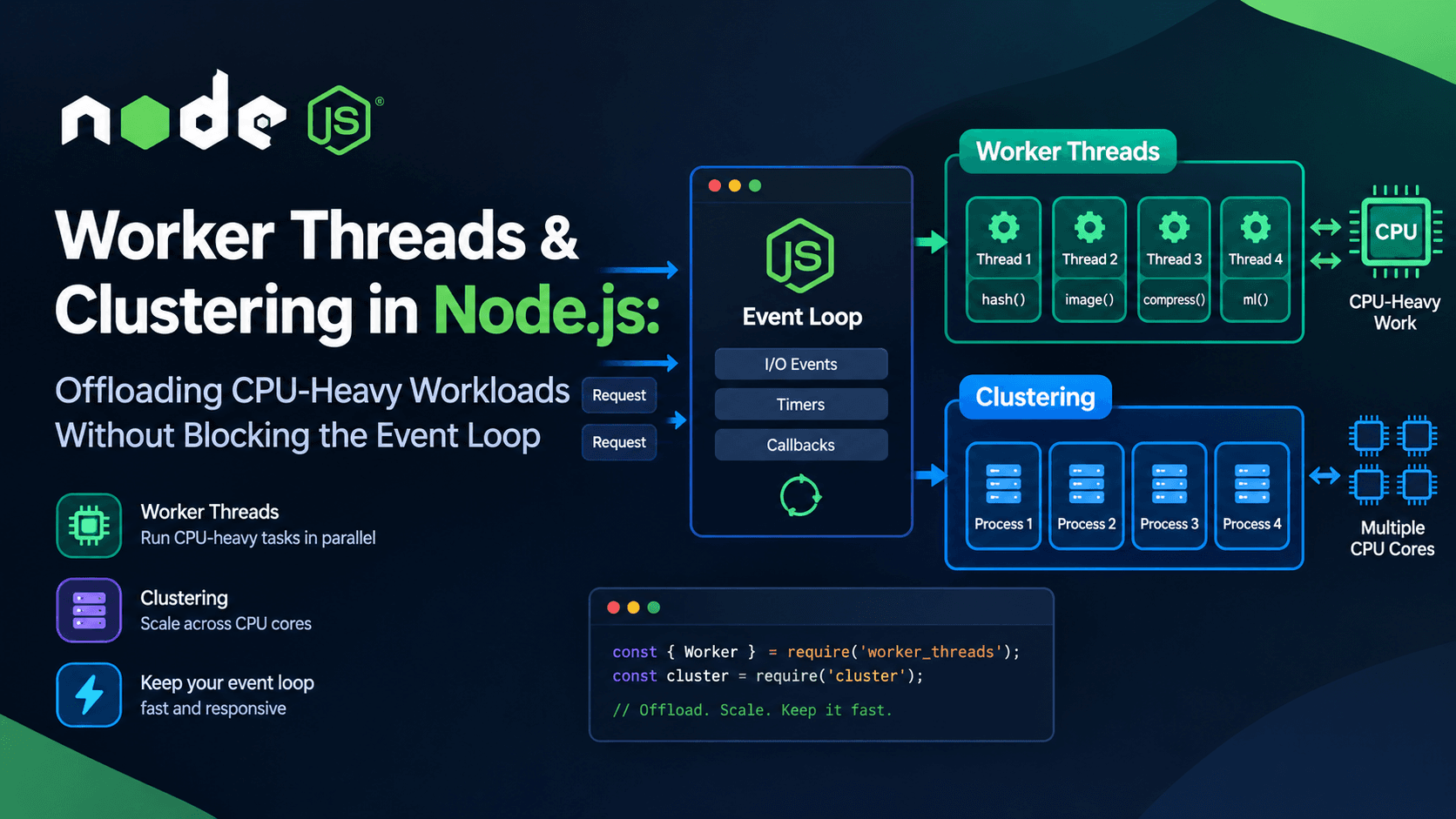
This article explains exactly why that happens at the runtime level, and walks through the two built-in tools Node.js gives you to fix it: the worker_threads module and the cluster module. You'll see working code for offloading image processing and cryptographic operations, a breakdown of when to reach for threads versus processes, and the pitfalls that turn a "fix" into a new bottleneck.
Node.js runs your JavaScript on a single call stack, managed by an event loop. Asynchronous I/O — file reads, network requests, database queries — doesn't run on that call stack at all. It's delegated to the operating system kernel or to libuv's internal thread pool, and only the callback comes back to the main thread once the work is done. That's why Node.js can hold thousands of open sockets without needing thousands of threads: the waiting happens elsewhere.
CPU-bound work is different. A for loop that resizes pixel data, a synchronous crypto call, a synchronous JSON parse of a huge payload — none of that is I/O. It's raw computation, and it can only execute on the call stack itself. While it runs, the event loop cannot process any other timer, network event, or I/O callback. Every concurrent request your server was handling effectively freezes until that one computation finishes.
This is the core mechanism you need to internalize: Node.js doesn't get slow because it's single-threaded; it gets slow because a single thread is being asked to do work that competes directly with the scheduler responsible for everything else.
The single-threaded myth, clarified
It's a common misconception that "Node.js is single-threaded" in an absolute sense. In reality, Node.js itself uses multiple threads under the hood — libuv maintains a small thread pool for things like file system operations and DNS lookups. What's actually single-threaded is the JavaScript execution context: your application code runs on exactly one thread unless you explicitly create more.
Node's own official guide, "Don't Block the Event Loop (or the Worker Pool)", lays out this distinction directly: the Event Loop handles initialization and callbacks, while a separate Worker Pool handles certain expensive operations, and blocking either one hurts both throughput and, in adversarial scenarios, security.
That libuv thread pool, however, is not something you can casually dump arbitrary CPU-heavy JavaScript into. It's small, shared with other subsystems, and offloading heavy computation onto it without care simply moves the bottleneck instead of solving it. For genuinely CPU-intensive JavaScript, Node.js gives you a dedicated mechanism: worker threads.
Worker Threads: running JavaScript in parallel
The node:worker_threads module, stable since Node.js 12, lets you spin up additional threads that each run their own instance of the V8 JavaScript engine, with their own event loop, independent of the main thread. Per the official API reference linked above, workers are specifically useful for performing CPU-intensive JavaScript operations, and unlike child_process or cluster, worker threads can share memory directly by transferring ArrayBuffer instances or sharing SharedArrayBuffer instances.
This distinction matters. A worker thread is not a new process — it's a new thread inside the same Node.js process, which makes communication cheaper than spawning a full child process, while still giving your CPU-bound code a separate execution context that doesn't compete with the main thread's event loop.
// worker.js
const { parentPort, workerData } = require('node:worker_threads');

function heavyComputation(input) {
  // CPU-bound logic goes here
  let result = 0;
  for (let i = 0; i < input.iterations; i++) {
    result += Math.sqrt(i);
  }
  return result;
}

const output = heavyComputation(workerData);
parentPort.postMessage(output);
Notice that the main thread's HTTP server never touches the loop directly — it just awaits a promise that resolves when the worker posts a message back. The event loop stays free to serve other requests the entire time the worker is computing.
Practical example: hashing passwords without blocking requests
Password hashing with algorithms like scrypt or pbkdf2 is deliberately slow — that's the point, it resists brute-force attacks. But "deliberately slow" and "blocking every other request on your server" are a dangerous combination at scale. Node's built-in crypto module offers asynchronous versions of these functions, but even the async variants run on the shared libuv thread pool described in the event-loop guide, and a burst of signups can starve other operations (like TLS handshakes or file I/O) that rely on the same pool.
Offloading hashing to a dedicated worker thread, using the worker_threads API, isolates that cost entirely:
Even though crypto.scrypt is already asynchronous, running it inside its own worker thread means a spike in signup traffic no longer competes with your API's regular request handling for the same shared thread pool resources documented in the crypto module reference.
Practical example: offloading image processing
Image resizing, format conversion, and thumbnail generation are classic CPU-bound tasks — decoding, resampling, and re-encoding pixel data is pure computation, and libraries that do this synchronously (or with a synchronous hot path) will stall the event loop for the duration of the operation, exactly the scenario the worker_threads documentation recommends threads for.
An Express route can now accept an upload, kick off the resize in a worker, and immediately keep processing other incoming requests while the transformation runs in parallel:
For binary pixel data specifically, you can go further and avoid copying buffers between threads altogether by using a SharedArrayBuffer, which both the main thread and the worker can read and write directly without serialization overhead — covered under transferable and shared memory objects in the worker_threads API docs.
Building a reusable worker pool
Spawning a brand-new Worker for every single request works for a demo, but it doesn't scale. Creating a thread has real overhead — a new V8 isolate, a new event loop, memory allocation — and if your endpoint gets hit hundreds of times a second, you'll spend more time spinning threads up and tearing them down than doing actual work.
The standard solution is a worker pool: a fixed number of long-lived worker threads that pull tasks from a shared queue.
The pool size above is calculated with os.availableParallelism(), which the official Node.js docs describe as returning an estimate of the default amount of parallelism a program should use — the documented, current replacement for the older os.cpus().length pattern.
This is a simplified illustration of the worker-pool pattern. The official documentation goes a step further and recommends using the AsyncResource API so diagnostic tooling can correctly correlate tasks with their outcomes in pooled workers — see Using AsyncResource for a Worker thread pool in the async context tracking docs.
Clustering: scaling across CPU cores
Worker threads solve the "don't block the event loop" problem. They do not, by themselves, let a single Node.js process use more than one CPU core for the main application logic — each worker thread still shares the process's memory space and is best suited to isolated computational tasks, not necessarily running your entire application in parallel.
That's where the node:cluster module comes in. The official documentation states that clusters of Node.js processes can be used to run multiple instances of Node.js that distribute workloads among their application threads, and that the cluster module allows easy creation of child processes that all share server ports.
A cluster works by forking your process into a primary and multiple workers — each worker is a full, independent Node.js process with its own event loop, its own memory, and its own V8 instance. The primary process doesn't handle requests itself; it distributes incoming connections across the worker processes, typically using round-robin scheduling on most platforms, as detailed in the "How it works" section of the cluster docs.
Because each cluster worker is a separate OS process, a CPU-heavy request in one worker only blocks that worker's event loop — the other worker processes keep serving traffic normally. This makes clustering the right tool for horizontal scaling of request-handling capacity, while worker threads (per the worker_threads docs) are the right tool for isolating a specific CPU-bound task from the rest of one process's work.
A useful mental model: cluster scales your server, worker threads scale a specific computation. Many production Node.js applications use both together.
Combining clustering and worker threads
These two tools solve different layers of the same problem, and they compose cleanly. A common production pattern:
Use cluster to fork one worker process per CPU core, so your HTTP server can handle more concurrent connections than a single process could.
Within each cluster worker process, use a worker_threads pool to handle any individual CPU-intensive task (image resizing, hashing, compression) without blocking that process's own event loop.
// Inside each cluster worker process
const WorkerPool = require('./worker-pool');
const pool = new WorkerPool('./image-worker.js', 2); // 2 threads per cluster worker

app.post('/resize', async (req, res) => {
  const result = await pool.runTask({ inputPath: req.file.path, width: 800 });
  res.json(result);
});
This gives you two independent axes of concurrency: process-level parallelism for handling more simultaneous requests, and thread-level parallelism for keeping any single process responsive while it does heavy computation. Be mindful of your total thread and process count relative to the value returned by os.availableParallelism() — oversubscribing cores with more active threads than the hardware can execute in parallel leads to context-switching overhead that erodes the benefit you were chasing.
Common pitfalls
Spawning a worker per request. Thread creation isn't free. Use a pool for anything beyond low, sporadic traffic.
Sending huge payloads via postMessage unnecessarily. Structured cloning large objects between threads costs time and memory. Use Transferable objects or SharedArrayBuffer, as documented in the worker_threads API, for large binary data like image buffers.
Forgetting to terminate workers. Idle workers that are never .terminate()-d keep threads (and memory) alive indefinitely.
Assuming worker threads fix I/O-bound slowness. They don't. Per the official docs, workers help CPU-intensive JavaScript operations, not I/O-intensive work, since Node's built-in asynchronous I/O is already more efficient for that case.
Ignoring error and exit events. A worker that throws an uncaught exception will emit an 'error' event; if you don't listen for it, the failure can go silent while the associated promise never resolves.
Treating cluster workers as stateless by default when they aren't. In-memory caches, rate limiters, or session stores built without cluster-awareness will behave inconsistently, since each cluster worker has its own separate memory.
Running synchronous crypto or compression functions on the main thread "just this once." One synchronous crypto call under load is often the actual root cause behind reports of "random" latency spikes in Node.js APIs — precisely the scenario described in the event-loop guide.
Keep worker scripts stateless and focused on one type of task per pool.
Use SharedArrayBuffer or transferable objects for large binary payloads, per the worker_threads docs.
Always attach 'error' and 'exit' listeners to every worker.
Combine cluster for request-level scaling with worker_threads for computation-level isolation when both are needed.
Gracefully terminate workers and cluster workers on shutdown signals (SIGTERM/SIGINT) to avoid orphaned processes in production deployments.
FAQ
Do worker threads make Node.js multi-threaded like Java or Go?
Not in the same sense. Each worker thread runs its own isolated V8 instance and event loop; they don't share arbitrary application state the way threads do in languages with a shared-memory threading model by default. They do allow explicit memory sharing via SharedArrayBuffer, documented in the worker_threads reference, but that's opt-in, not automatic.
Should I use worker_threads or a message queue (like BullMQ with Redis) for background jobs?
Worker threads are best for in-process, short-to-medium CPU-bound tasks tied to the current request lifecycle (resize this image, hash this password). A dedicated job queue is better for long-running, retryable, or cross-process background work that shouldn't be coupled to a single server instance's uptime.
Does clustering share memory between workers?
No. Per the cluster documentation, each cluster worker is a separate OS process with fully isolated memory. Anything that needs to be shared across workers — session state, caches, rate-limit counters — needs an external store such as Redis, or a pub/sub mechanism between workers.
Will adding worker threads always make my app faster?
Only for genuinely CPU-bound work. For I/O-bound operations — database queries, HTTP calls, file reads — Node's native asynchronous I/O is already efficient, as the event-loop guide explains, and adding a worker thread introduces overhead (serialization, thread management) without a real gain.
How many worker threads should I create?
A common starting point is os.availableParallelism() (the Node.js–recommended way to estimate usable parallelism), then adjust based on real load testing. More threads than available cores usually adds context-switching overhead rather than throughput.
Conclusion
CPU-heavy work and Node.js's single-threaded execution model aren't fundamentally incompatible — but treating them as compatible by default is how event loop stalls, timeout cascades, and mysterious latency spikes get into production. worker_threads gives you a way to isolate JavaScript computation into its own thread and event loop, sharing memory efficiently when needed. cluster gives you a way to scale request handling across every core your machine has. Used separately or together, they let a Node.js application do genuinely parallel work — encrypting data, transforming images, running heavy synchronous computation — without ever stalling the thread that's supposed to be listening for the next request.