We use cookies for analytics and advertising. Ads are disabled until you accept advertising cookies. Read our Cookie Policy and Privacy Policy.
Build a RAG Pipeline with Qdrant: A Step-by-Step Guide | TVerge Tech
Build a RAG Pipeline with Qdrant: A Step-by-Step Guide
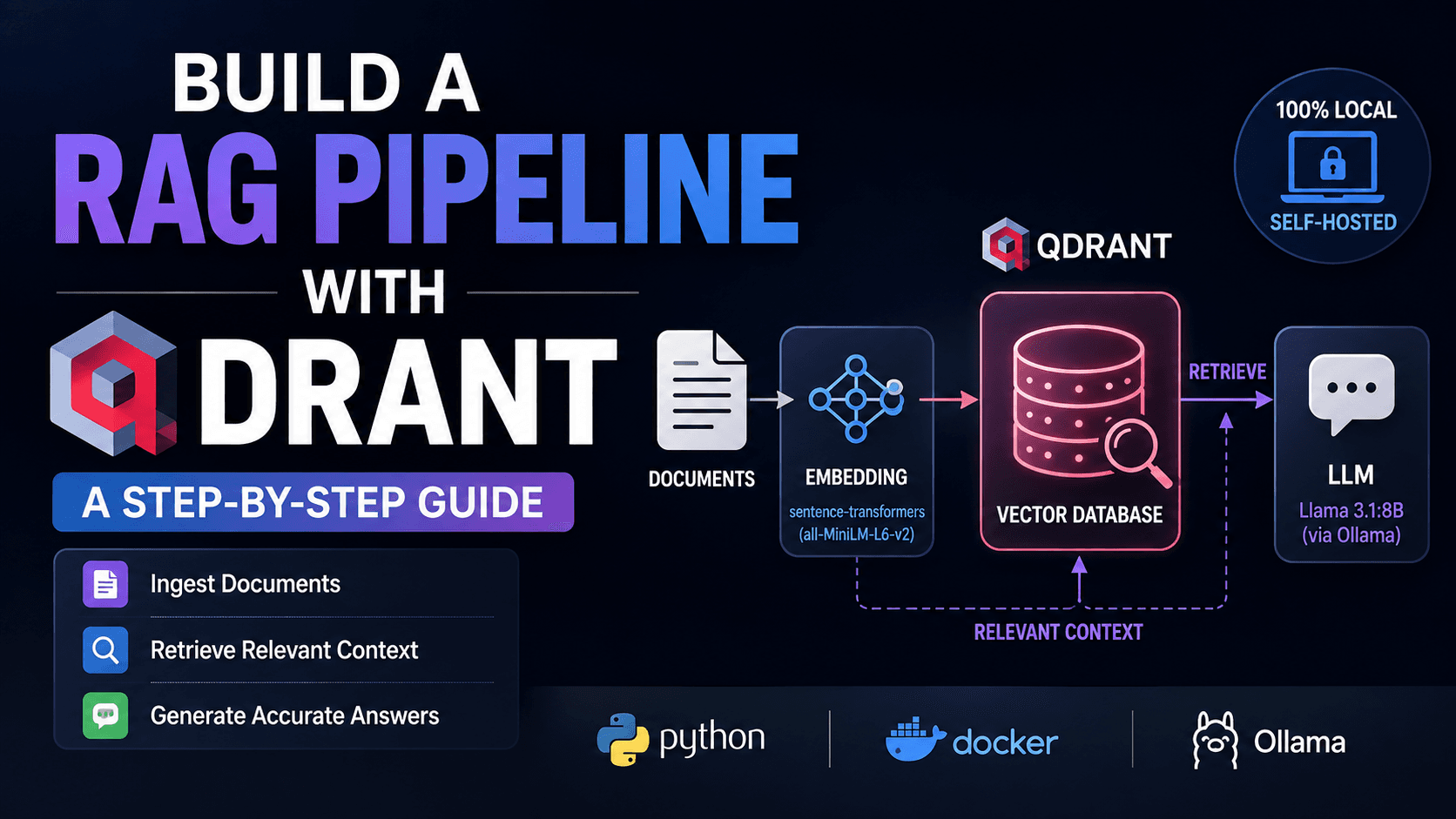
A hands-on walkthrough for building a retrieval-augmented generation pipeline from scratch using Qdrant, sentence-transformers, and Ollama — chunking, embedding, indexing, and grounded generation.
Build a RAG Pipeline with Qdrant: A Step-by-Step Guide
Most RAG tutorials fail quietly rather than loudly: the index builds, the query runs, a response comes back — and it's wrong in a way that looks correct, because nothing in the pipeline actually checked whether the retrieved context had anything to do with the answer. That failure mode traces back to three specific decisions most walkthroughs skip past: how text gets cut into chunks, whether the vector dimensions on both sides of the pipeline actually agree with each other, and whether a similarity score is high enough to trust before it ever reaches the model. This build treats each of those as a checkpoint rather than an assumption. What you'll end up with is a self-hosted pipeline — Qdrant for the vector index, a local sentence-transformer for embeddings, and a local Llama model for generation — with every one of those decision points exposed in code instead of buried inside a framework default.
Prerequisites
Python 3.11 or newer, with venv available
Docker Engine or Docker Desktop running locally (for Qdrant)
Ollama installed, for local LLM inference (no API key required)
At least 8GB of free RAM — the llama3.1:8b model and the embedding model both need headroom
Basic familiarity with the command line and with running pip install
No prior Qdrant or vector database experience assumed
Step 1: Set Up the Python Environment
Create an isolated environment and install the four packages this pipeline depends on: the Qdrant client, sentence-transformers for embeddings, pypdf for document loading, and requests for talking to Ollama's local API.
Expected output: pip resolves and installs roughly a dozen packages (including torch as a dependency of sentence-transformers), ending with Successfully installed .... If torch fails to build on your platform, install the CPU-only wheel first with pip install torch --index-url https://download.pytorch.org/whl/cpu, then rerun the command above.
Step 2: Start Qdrant in Docker
Qdrant ships as a single container with no external dependencies, which is most of the reason it fits a local tutorial well — there's no separate metadata store or cluster coordinator to stand up. Run it with a mounted volume so your index survives container restarts.
Port 6333 serves the REST/dashboard API, 6334 serves gRPC. Checkpoint: visit http://localhost:6333/dashboard in a browser — you should see the Qdrant web UI with an empty collections list. If the container exits immediately, check docker logs qdrant-rag; the most common cause is another process already bound to port 6333.
Qdrant vs. Chroma for this pipeline: both are open-source and embeddable, but Qdrant exposes payload-based filtering (metadata queries alongside vector search) and a persistent HTTP server out of the box, which is why it's used here instead of Chroma's simpler in-process store — the moment you need to filter retrieved chunks by source document or date, that logic lives in the database rather than in application code.
Step 3: Chunk the Source Documents
Retrieval quality is bounded by chunk quality before it's bounded by anything about the model. A chunk that's too large drags irrelevant text into the context window; too small, and it loses the surrounding sentence that gives a fact its meaning. We'll use a fixed-size character-based chunker with overlap, which is crude but transparent — you can see exactly why a given chunk was retrieved.
Create chunker.py:
from pypdf import PdfReader

def load_pdf_text(path: str) -> str:
    reader = PdfReader(path)
    return "\n".join(page.extract_text() or "" for page in reader.pages)

def chunk_text(text: str, chunk_size: int = 800, overlap: int = 150) -> list[str]:
    chunks = []
    start = 0
    while start < len(text):
        end = start + chunk_size
        chunks.append(text[start:end])
        start = end - overlap
    return [c.strip() for c in chunks if c.strip()]
chunk_size=800 characters is roughly 130–160 tokens for English prose — small enough that a single chunk stays topically coherent, large enough to avoid fragmenting sentences mid-thought. The 150-character overlap means a fact sitting near a chunk boundary still appears intact in at least one of the two adjacent chunks. Checkpoint: run chunk_text("your test string" * 100) in a REPL and confirm consecutive chunks share the expected 150-character overlap at their boundaries.
Step 4: Generate Embeddings and Create the Qdrant Collection
We're using all-MiniLM-L6-v2, a 384-dimension sentence-transformer model. It's not the highest-scoring embedding model on retrieval benchmarks, but it runs on CPU in well under a second per chunk, which matters for a tutorial you're meant to actually run. Whatever model you pick, the Qdrant collection's vector size has to match the model's output dimension exactly — this is the single most common failure point in a first RAG build.
Create setup_collection.py:
from qdrant_client import QdrantClient
from qdrant_client.models import Distance, VectorParams

client = QdrantClient(url="http://localhost:6333")

client.recreate_collection(
    collection_name="techverge_docs",
    vectors_config=VectorParams(size=384, distance=Distance.COSINE),
)
size=384 corresponds directly to all-MiniLM-L6-v2's output — if you later swap in a model like bge-large-en-v1.5 (1024 dimensions), this value has to change too, or every upsert will fail with a dimension mismatch error. Distance.COSINE is the standard choice for sentence-transformer embeddings, since these models are trained with cosine similarity as the training objective.
Checkpoint: run the script, then check http://localhost:6333/collections/techverge_docs — you should see "status":"green" and "vectors_count":0.
Step 5: Embed and Upsert Chunks
Now connect the chunker to the embedding model and push the vectors into Qdrant, along with the original text stored as payload — Qdrant only stores and searches vectors, so anything you want to retrieve back at query time (the actual chunk text, source filename) has to travel alongside the vector as a payload dictionary.
import uuid
from sentence_transformers import SentenceTransformer
from qdrant_client import QdrantClient
from qdrant_client.models import PointStruct
from chunker import load_pdf_text, chunk_text

model = SentenceTransformer("all-MiniLM-L6-v2")
client = QdrantClient(url="http://localhost:6333")

def index_document(path: str, source_name: str):
    text = load_pdf_text(path)
    chunks = chunk_text(text)
    embeddings = model.encode(chunks, show_progress_bar=True)

    points = [
        PointStruct(
            id=str(uuid.uuid4()),
            vector=embedding.tolist(),
            payload={"text": chunk, "source": source_name},
        )
        for chunk, embedding in zip(chunks, embeddings)
    ]

    client.upsert(collection_name="techverge_docs", points=points)
    return len(points)

if __name__ == "__main__":
    count = index_document("your_document.pdf", "your_document.pdf")
    print(f"Indexed {count} chunks")
Each point gets a random UUID rather than a sequential integer ID — this matters once you're indexing multiple documents over time and don't want ID collisions between separate ingestion runs. Expected output: a progress bar during encoding, followed by Indexed N chunks, where N depends on your source document's length divided by the ~650-character effective stride (800 minus 150 overlap).
Step 6: Build the Retrieval Function
Retrieval is symmetric with indexing: embed the query with the same model, then ask Qdrant for the nearest vectors by cosine similarity.
def retrieve(query: str, top_k: int = 5, score_threshold: float = 0.35):
    query_vector = model.encode(query).tolist()
    results = client.search(
        collection_name="techverge_docs",
        query_vector=query_vector,
        limit=top_k,
        score_threshold=score_threshold,
    )
    return [(r.payload["text"], r.score, r.payload["source"]) for r in results]
The score_threshold=0.35 is a deliberate, visible decision rather than a default — cosine similarity scores from MiniLM-class models for genuinely relevant passages typically land between 0.3 and 0.6, so a hard floor at 0.35 filters out near-random matches without being so strict that it returns nothing on a legitimate but loosely-worded query. Common Errors below covers what to do if this returns an empty list.
Step 7: Pull a Local Model and Wire Up Generation
Pull the generation model through Ollama, which handles quantization and serving without any manual setup:
ollama pull llama3.1:8b
Expected output: a download progress bar (the quantized model is roughly 4.7GB), ending with success. Ollama exposes a local HTTP API on port 11434 by default — no code changes needed to reach it once the model's pulled.
Now write the generation step, which assembles retrieved chunks into a prompt and sends it to Ollama:
import requests

def generate_answer(query: str, retrieved_chunks: list[tuple[str, float, str]]) -> str:
    context = "\n\n".join(f"[{src}]: {text}" for text, score, src in retrieved_chunks)

    prompt = f"""Answer the question using only the context below. If the context doesn't contain the answer, say so explicitly rather than guessing.

Context:
{context}

Question: {query}

Answer:"""

    response = requests.post(
        "http://localhost:11434/api/generate",
        json={"model": "llama3.1:8b", "prompt": prompt, "stream": False},
    )
    return response.json()["response"]
The instruction to say "so explicitly rather than guessing" is doing real work here — without it, models reliably fall back on parametric knowledge when retrieval comes up short, which produces answers that sound grounded but aren't. This is the most common source of hallucination in RAG systems that otherwise look correctly wired.
Step 8: Run the Full Pipeline
Tie it together in a query script:
if __name__ == "__main__":
    query = "What does the document say about deployment requirements?"
    chunks = retrieve(query)

    if not chunks:
        print("No relevant context found — check score_threshold or reindex.")
    else:
        answer = generate_answer(query, chunks)
        print(answer)
Checkpoint: run the script against a document you've already indexed. You should see a generated answer that references specific content from your source PDF, not a generic response. If you print chunks before generation, each tuple's score should be above your 0.35 threshold and the text field should visibly relate to the query — if it doesn't, the problem is upstream in chunking or embedding, not in generation.
Dimension mismatch on upsert. The embedding model's output size doesn't match the collection's VectorParams(size=...). Recreate the collection with the correct size, or confirm which model was used to create it originally.
Connection refused on localhost:6333. The Qdrant container isn't running. Check docker ps — if qdrant-rag isn't listed, rerun the docker run command from Step 2; if it exited, check docker logs qdrant-rag for a port conflict.
retrieve() returns an empty list. Usually score_threshold set higher than your embedding model's typical relevance range, or the collection is genuinely empty. Lower the threshold to 0.0 temporarily and inspect the raw scores to recalibrate.
Ollama request hangs or times out. The model hasn't finished loading into memory on first request — this is normal for the first call after ollama pull or after Ollama has been idle; subsequent requests are faster once the model is resident.
Answers ignore the retrieved context. Check that context is actually non-empty in the assembled prompt before it's sent — this usually traces back to a retrieval step silently returning zero chunks upstream, not to the generation step itself.
Key Takeaways
Chunk size and overlap are decisions with visible downstream consequences, not defaults to skip past — 800 characters with 150 overlap is a starting point to tune against your own documents, not a rule.
The embedding model's output dimension and the Qdrant collection's configured vector size have to match exactly; this is the single most common integration failure in a first build.
A score_threshold on retrieval, chosen by inspecting real similarity scores rather than guessed, is what prevents low-relevance chunks from reaching the generation step.
An explicit instruction to acknowledge missing context, not guess, is what actually reduces hallucination — the retrieval step alone doesn't guarantee grounded answers.
For deeper background on picking an embedding model for your own corpus, see our comparison of open-source embedding benchmarks (INTERNAL LINK: embedding-model-benchmarks). If you're scaling this past a single machine, our breakdown of Qdrant's clustering and sharding options (INTERNAL LINK: qdrant-production-deployment) covers what changes at production scale. For the official API reference used throughout this walkthrough, see the Qdrant Python client documentation and the Ollama /api/generate reference.
3Demystifying the Rust Borrow Checker: Fix Lifetime Errors Fast