We use cookies for analytics and advertising. Ads are disabled until you accept advertising cookies. Read our Cookie Policy and Privacy Policy.
Reducing Docker Image Size with Multi-Stage Builds and Distroless Bases | TVerge Tech
Reducing Docker Image Size with Multi-Stage Builds and Distroless Bases
A practical walkthrough of shrinking Docker images with multi-stage builds and Google's distroless base images — including the shell-access trade-offs most guides skip.
Reducing Docker Image Size with Multi-Stage Builds and Distroless Bases
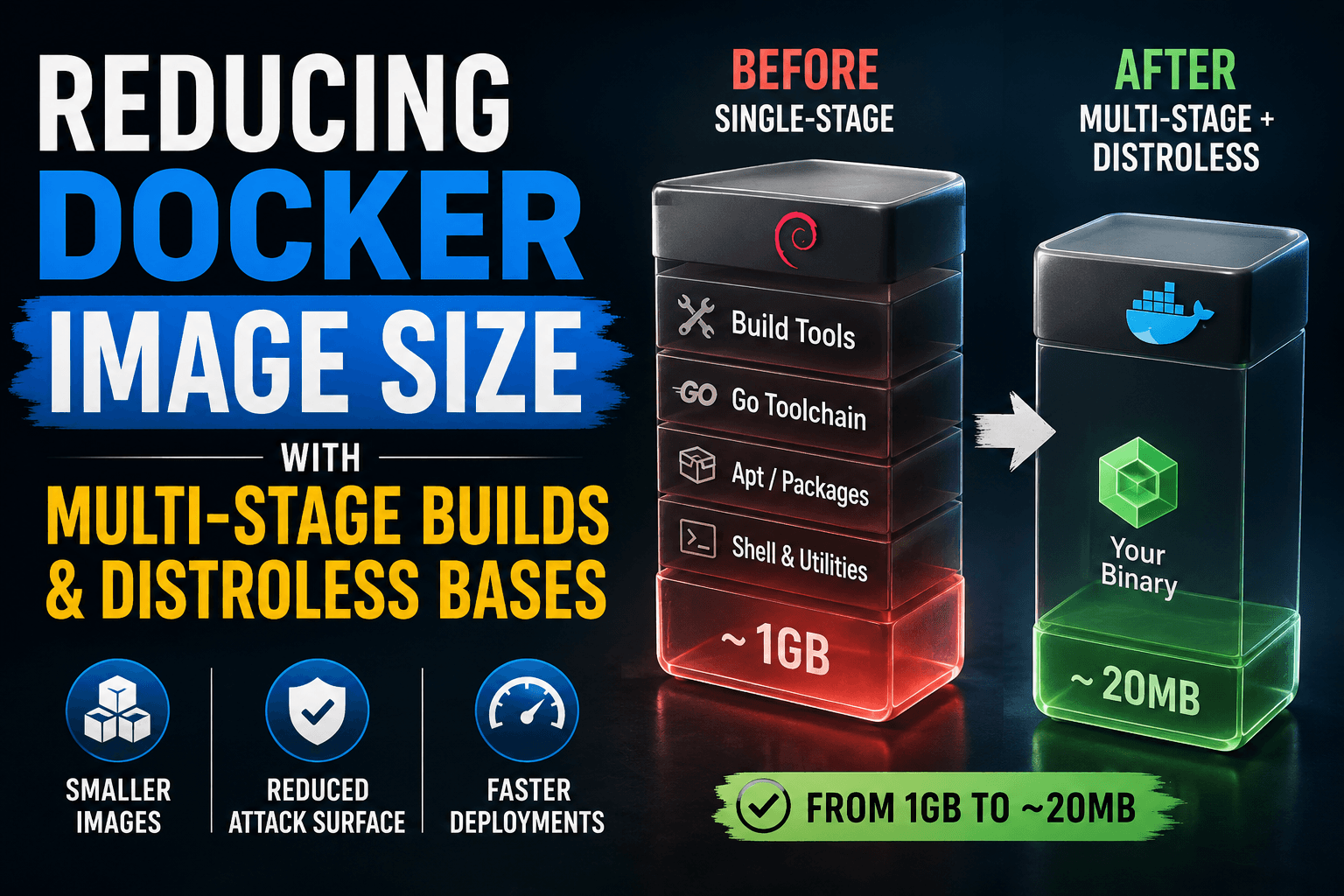
A Node or Go image built naively from a full Debian base routinely ships 800MB to 1GB for an application whose actual runtime footprint is a few dozen megabytes. The gap isn't the application — it's the compiler toolchain, package manager caches, shared libraries, and shell utilities that were only ever needed to build the thing, not run it, and that never get removed because a single-stage Dockerfile has no mechanism to leave them behind. This tutorial rebuilds that image twice: once to separate build-time weight from runtime weight with multi-stage builds, and once more to strip the runtime environment down to a distroless base with no shell, no package manager, and a meaningfully smaller attack surface.
Prerequisites
Docker Engine 23.0+ with BuildKit enabled (docker buildx version to confirm)
A working single-stage Dockerfile for a compiled or transpiled application (examples below use Go, since its static-binary output makes the distroless step unambiguous)
Familiarity with FROM, COPY, and RUN — this tutorial assumes you can already write a basic Dockerfile
Optional but useful: docker history and docker images for measuring the before/after difference yourself
Expected output: The SIZE column will typically show something in the 900MB–1.1GB range for the full golang base image, even though the compiled server binary itself is likely under 20MB. Everything else in that number is the Go toolchain, apt package lists, and Debian userland that has no purpose after go build finishes — it's just along for the ride because a single FROM means one image serves as both build environment and shipping artifact.
Step 2: Separate Build and Runtime With a Multi-Stage Build
A multi-stage build uses more than one FROM instruction in a single Dockerfile, where each FROM starts an independent stage with its own base image and its own layer history, as described in Docker's multi-stage builds guide. Only the final stage becomes the image that gets tagged and shipped; earlier stages exist purely to produce artifacts that later stages selectively copy in with COPY --from.
# syntax=docker/dockerfile:1

# Stage 1: build environment — discarded after this stage
FROM golang:1.23 AS builder
WORKDIR /app
COPY go.mod go.sum ./
RUN go mod download
COPY . .
RUN CGO_ENABLED=0 GOOS=linux go build -o server .

# Stage 2: runtime environment — this is what ships
FROM debian:bookworm-slim
WORKDIR /app
COPY --from=builder /app/server .
CMD ["./server"]
CGO_ENABLED=0 matters here specifically: it forces a statically linked binary with no dynamic dependency on glibc or other shared libraries. That's what makes it possible to run the binary in a runtime stage that doesn't share the builder's filesystem — without it, the binary would fail at startup with a missing shared-library error the moment it lands in a leaner base.
Switching from the full golang image to debian:bookworm-slim as the runtime base should drop the reported size from roughly 1GB to somewhere in the 80–120MB range — the Go toolchain and build cache never make it into the final stage at all, since COPY --from=builder only pulls the one file that was explicitly named.
Step 3: Replace the Runtime Base With a Distroless Image
debian:bookworm-slim is still a full Linux userland: it has a shell, a package manager, and general-purpose utilities the application will never call. Google's distroless project provides base images containing only an application's language runtime and its direct dependencies — no shell, no package manager, no coreutils — which shrinks both the image size and the set of binaries an attacker could use if they gained code execution inside the container.
# syntax=docker/dockerfile:1

FROM golang:1.23 AS builder
WORKDIR /app
COPY go.mod go.sum ./
RUN go mod download
COPY . .
RUN CGO_ENABLED=0 GOOS=linux go build -o server .

FROM gcr.io/distroless/static-debian13
WORKDIR /app
COPY --from=builder /app/server .
CMD ["./server"]
gcr.io/distroless/static-debian13 is the correct variant for a statically linked binary with no libc dependency at all — distroless also publishes base-debian13 for binaries that still need glibc, and language-specific variants like python3-debian13 or nodejs22-debian13 for interpreted runtimes, all listed in the distroless repository.
The static-debian13 base itself is close to 2MB, so the final image size should now track the application binary almost directly — for a small Go service, expect a total somewhere around 20–25MB, down from the ~1GB baseline in Step 1.
Step 4: Adjust Debugging Workflow for a Shell-less Image
The most common surprise after this switch: docker exec -it <container> sh fails immediately, because there is no shell binary in the image to execute. This isn't a bug — it's the entire point of a distroless base — but it does mean the debugging habit of shelling into a running container needs to change.
Comparison callout:Debian-slim vs. distroless — Debian-slim keeps a shell and package manager for interactive debugging at the cost of a larger image and more installed binaries an attacker could leverage; distroless removes both, trading debuggability for a materially smaller attack surface.
Distroless addresses this with a parallel :debug tag for each image, which adds a minimal BusyBox shell without pulling in the full base:
docker run --rm -it --entrypoint sh gcr.io/distroless/static-debian13:debug
Use the :debug tag locally or in a staging environment when you need to inspect the filesystem, and keep the non-debug tag for anything that ships.
Choosing a Base: Slim vs. Alpine vs. Distroless
Base image
Typical size
Shell / package manager
Best fit
debian:bookworm-slim
~80MB
Yes (bash/sh, apt)
Apps that still need to install a runtime dependency at container start, or that call system binaries
alpine
~5-7MB
Yes (sh, apk)
A middle ground when you need a shell for debugging but want a much smaller base than Debian; note musl libc can behave subtly differently from glibc for some binaries
gcr.io/distroless/*
~2-25MB depending on variant
No
Statically compiled or interpreted-runtime apps where the image is a production artifact, not a debugging environment
Common Errors
exec user process caused: no such file or directory on a distroless runtime — Almost always a dynamically linked binary running against a static-debian13 base. Either rebuild with CGO_ENABLED=0 for a fully static binary, or switch to the base-debian13 variant that includes glibc.
OCI runtime exec failed: exec: "sh": executable file not found — Expected behavior when running docker exec against a non-debug distroless image. Use the :debug tag instead, per Step 4.
Multi-stage build still produces a large final image — Check that the last FROM in the file is the intended runtime base, not the builder stage. If a Dockerfile ends on the builder stage by accident (no final runtime FROM), docker build tags the entire build environment, toolchain included.
Non-root USER instruction fails on distroless — Some distroless variants ship a nonroot tag (e.g., static-debian13:nonroot) with a pre-created non-root user already set, since there's no shell to run useradd against; use the tagged variant rather than trying to create a user inside the Dockerfile.
Key Takeaways
Multi-stage builds separate what's needed to build an application from what's needed to run it — only the final FROM stage ships, and everything else is discarded automatically.
A statically linked binary (CGO_ENABLED=0 for Go, or an equivalent for other languages) is what makes a genuinely minimal runtime base like distroless viable in the first place.
Distroless images trade shell access and a package manager for a smaller image and a reduced attack surface — use the :debug tag for interactive troubleshooting rather than reintroducing a shell into the production image.
Image size reduction and CI build speed are separate optimization targets that happen to share techniques like multi-stage builds; a smaller final image doesn't by itself make the CI job that produces it any faster, which is where layer caching strategy becomes the complementary half of the picture.
3Demystifying the Rust Borrow Checker: Fix Lifetime Errors Fast