Advanced Caching Mechanisms: Fetch Overrides, the Data Cache, and Breaking revalidateTag Across Distributed Networks
Caching in Next.js looks deceptively simple on the surface: call fetch, get cached data, call revalidateTag, get fresh data. That mental model holds up fine on a single server running a single process. It falls apart the moment your application runs on more than one instance — multiple containers behind a load balancer, multiple regions, or a horizontally scaled Node.js deployment.
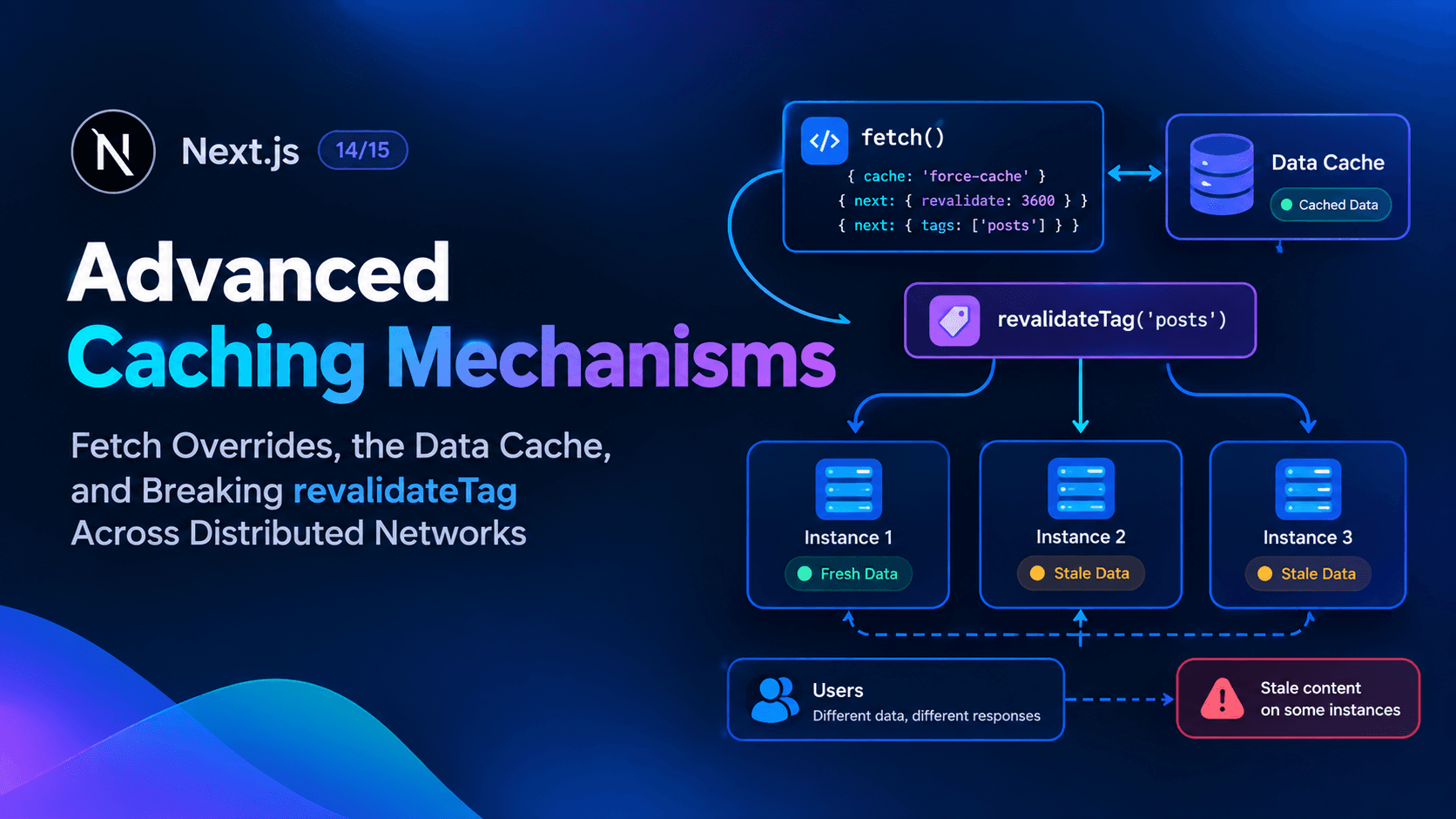
This is where a surprising number of production incidents originate: a developer calls revalidateTag('posts') after a content update, confirms the change locally, ships it, and then gets a report that some users are still seeing stale content minutes — or hours — later. The tag did revalidate. It just revalidated on one instance, not all of them.
This deep dive covers three layers of the caching stack that most tutorials skip: how fetch's caching options actually behave, what the Data Cache is doing under the hood, and precisely why revalidateTag breaks down once you're running more than one server instance — plus how to fix it with a custom cache handler.
Layer One: fetch Overrides and What They Actually Control
Next.js extends the native Web fetch() API so that a server-side request can declare its own persistent caching and revalidation behavior. According to the official fetch API reference, this extension revolves around two request options plus a separate memoization layer that's easy to confuse with caching.
options.cache
js
fetch('https://...', { cache: 'force-cache' | 'no-store' })
auto no cache(the default) — Next.js fetches from the remote server on every request in development, but fetches once duringnext buildbecause the route gets statically prerendered. If the route uses request-time APIs (like reading cookies or headers), Next.js fetches fresh data on every request instead.no-store— Fetches from the remote server on every request, regardless of whether request-time APIs are present.force-cache— Looks for a matching entry in the server-side cache, keyed on URL, method, headers, and body. A fresh match is returned from cache; a missing or stale match triggers a new fetch and a cache update. Only200responses are stored.
A detail that trips people up: caching is opt-in for anything beyond simple GET requests. You must explicitly set cache: 'force-cache' to cache POST requests or requests carrying authorization or cookie headers — Next.js won't cache those by default even under force-cache's general behavior, precisely because caching authenticated or mutating requests by accident is a common source of data leaks between users.
options.next.revalidate
js
fetch('https://...', { next: { revalidate: false | 0 | number } })
This sets the cache lifetime in seconds:
false— cache indefinitely (equivalent torevalidate: Infinity; the underlying HTTP cache may still evict old entries under memory pressure).0— never cache this specific resource.- a
number— cache for at most that many seconds.
Two behaviors worth internalizing before you set this per-request:
- If one
fetchcall in a route sets a lowerrevalidatevalue than the route's own default, the entire route's revalidation interval drops to match the lowest value. - If two
fetchcalls in the same route hit the same URL with differentrevalidatevalues, the lower value wins.
Setting { revalidate: 3600, cache: 'no-store' } together is a contradiction Next.js won't resolve for you — both options are ignored, and development mode prints a warning.
options.next.tags
js
fetch('https://...', { next: { tags: ['collection'] } })
This assigns cache tags to a request so it can be invalidated on demand later with revalidateTag. Tags are capped at 256 characters each, with a maximum of 128 tags per entry.
Memoization Is Not Caching
This is the override developers most often confuse with persistent caching. Per the official docs, fetch calls using GET with identical URLs and options are automatically memoized during a single server render pass — if the same request appears in multiple Server Components, layouts, or pages during one render, Next.js executes it once and shares the result across all of them. This memoization:
- Lasts only for the duration of a single render pass, not across requests.
- Does not apply inside Route Handlers, since they sit outside the React component tree.
- Can be opted out of by passing an
AbortControllersignal to thefetchcall.
If you're debugging why a fetch seems to run once even though you called it in five different components, that's memoization working as intended — it's a render-pass optimization, entirely separate from the Data Cache, which persists across requests.
Layer Two: What the Data Cache Actually Is
The Data Cache is Next.js's persistent, server-side HTTP cache for fetch results. Its job is to let data be fetched once — at build time or at request time — and then reused across subsequent requests without hitting the origin again, until it's explicitly or automatically revalidated.
A distinction worth being precise about, because platform documentation from Vercel draws it out clearly: the Data Cache and a CDN cache are not the same layer. A CDN cache stores full HTTP responses at the edge. The Data Cache stores the results of your application's internal data fetches — the output of fetch calls and unstable_cache-wrapped functions — on the server side. You can have a cache hit at the Data Cache layer and still generate a fresh HTML response, and vice versa. Treating them as interchangeable is a common source of confusion when debugging "why is this still stale" issues, because purging one doesn't necessarily purge the other.
Time-Based vs. On-Demand Revalidation
According to Next.js's guide on how revalidation works, there are exactly two revalidation models layered on top of the Data Cache:
- Time-based revalidation uses a stale-while-revalidate pattern. Cached content is served immediately; once its age exceeds the configured
cacheLifeorrevalidateduration, a background regeneration is triggered while the stale content keeps serving until the fresh version is ready. - On-demand revalidation explicitly purges cached content by calling
revalidateTag()orrevalidatePath(). The next request to that content — not the moment the function is called — triggers a fresh render.
That second point is easy to miss and worth repeating precisely because it changes how you should think about "instant" invalidation: calling revalidateTag doesn't push new content to users. It marks the tag as stale; the update only becomes visible the next time someone actually requests a page depending on that tag.
Explicit Tags vs. Soft Tags
The tag system has two categories:
- Explicit tags — set by you, either via
next: { tags: [...] }on afetchcall or viacacheTag()inside a'use cache'function. CallingrevalidateTag('my-tag', 'max')invalidates every cache entry carrying that tag. - Soft tags — generated automatically by Next.js from the route's path structure, prefixed internally with
_N_T_. A route like/blog/hellogenerates a chain of soft tags for each layout in its path (_N_T_/layout,_N_T_/blog/layout,_N_T_/blog/hello/layout) plus the leaf route itself. These are what makerevalidatePath()work under the hood — it's really just invalidating the soft tags associated with a path and its parent layouts.
Layer Three: Why revalidateTag Breaks Across Distributed Networks
Here's the mechanism behind the stale-content-after-deploy problem described at the top of this article, stated plainly by Next.js's own documentation: when running multiple Next.js instances behind a load balancer, revalidation events are local by default. Calling revalidateTag() on instance A only invalidates the cache on instance A. Every other instance keeps serving stale content from its own local cache until it independently learns about the invalidation — which, with the default in-memory handler, is never, because there's no cross-instance communication built in.
This isn't a bug. The default cache handler is an in-memory LRU cache scoped to a single process, by design, because most applications run on a single instance or a platform that already provides distributed cache coordination transparently. If you're deploying to a platform-managed environment, this may already be handled for you. If you're self-hosting across multiple Node.js processes, containers, or servers behind your own load balancer, it is not, and you need to build the coordination yourself.
The Two Hooks That Fix This
The cache handler API — configured via cacheHandlers in next.config.js — exposes exactly two hooks designed for this problem, according to the cacheHandlers API reference:
updateTags(tags, durations)— called wheneverrevalidateTag()is invoked. Your implementation should write the invalidation event to shared storage (Redis, DynamoDB, or any service every instance can reach) so other instances can eventually discover it.refreshTags()— called periodically, and always before a new request begins processing. Your implementation should read from that shared storage and update the instance's local tag state accordingly.
A companion method, getExpiration(tags), returns the most recent revalidation timestamp across a set of tags — 0 if none have ever been revalidated, or Infinity to defer that check into get() instead using the softTags parameter.
A Minimal Distributed Coordination Pattern
The official documentation walks through a Redis-backed example. The essential shape:
js
// cache-handlers/distributed-tags.js
const { createClient } = require('redis')
const client = createClient({ url: process.env.REDIS_URL })
client.connect()

const localTagTimestamps = new Map()

module.exports = {
  // ...get() and set() implementations for entry storage...

  async refreshTags() {
    const tagKeys = await client.sMembers('revalidated-tags')
    if (tagKeys.length > 0) {
      const values = await client.mGet(tagKeys.map((k) => `tag:${k}`))
      for (let i = 0; i < tagKeys.length; i++) {
        localTagTimestamps.set(tagKeys[i], Number(values[i]))
      }
    }
  },

  async getExpiration(tags) {
    const timestamps = tags.map((tag) => localTagTimestamps.get(tag) || 0)
    return Math.max(...timestamps, 0)
  },

  async updateTags(tags) {
    const now = Date.now()
    const pipeline = client.multi()
    for (const tag of tags) {
      pipeline.set(`tag:${tag}`, String(now))
      pipeline.sAdd('revalidated-tags', tag)
      localTagTimestamps.set(tag, now)
    }
    await pipeline.exec()
  },
}
A few implementation details from the official reference are easy to get wrong if you're writing this from scratch:
refreshTags()must catch its own errors. If it throws, the exception propagates as a request failure — not a graceful fallback. Wrapping it defensively lets requests continue serving the last known local tag state (potentially stale, but available) if Redis or your shared store is briefly unreachable.get()failures must returnundefined, not throw. An unhandled exception fromget()is not treated as a cache miss — it propagates as a render error. Returningundefinedis the only correct signal for "not found, render fresh."set()failures are non-fatal by design. Becauseset()runs asynchronously after the response has already started streaming to the user, a failed write simply means the entry is lost — the user still gets their response, and the next request triggers a fresh render.- Store cache entries themselves in shared storage too, not just the tag timestamps, if you want genuinely consistent content across instances rather than just synchronized invalidation. Atomic writes reduce (but don't eliminate) the window where one instance might serve a half-written entry.
A Second Failure Mode: HTML/RSC Payload Mismatch
Distributed tag coordination fixes when content gets invalidated. It doesn't automatically fix a related but separate problem: when a route is revalidated, Next.js regenerates both the HTML response and the RSC (React Server Components) payload from the same render, and stores them together in one cache entry. If a CDN or edge layer in front of your instances caches these two artifacts separately, with different TTLs or invalidation timing, users can end up with an HTML page from one render and an RSC payload from another during client-side navigation — visibly broken or inconsistent UI.
The documented mitigation is straightforward but easy to skip if you're managing your own CDN configuration: respect the Vary header Next.js sets, and never split the caching policy for HTML and RSC responses to the same route.
There's also a distinct, unrelated failure mode worth knowing about: cross-deployment skew. During a rolling deployment, a client that loaded your app from deploy A might send a subsequent request that lands on a server already running deploy B. Configuring deploymentId mitigates this — when the client detects a mismatched deployment ID, it forces a hard navigation instead of a client-side one, guaranteeing it fetches consistent content from the currently running deployment.
Design Checklist for Multi-Instance Caching
- Confirm whether your hosting platform already provides distributed cache/tag coordination before building your own — check your platform's documentation first.
- If self-hosting across multiple instances, implement
updateTags()andrefreshTags()against a shared store (Redis, DynamoDB, or an internal service) rather than relying on the default in-memory handler. - Always wrap
refreshTags()in error handling so a temporary connectivity issue degrades to stale content instead of failing requests outright. - Return
undefinedfromget()on any internal failure — never let an exception escape and become a render error. - Store cache entries (not just tag timestamps) in shared storage if you need cross-instance content consistency, not just synchronized invalidation timing.
- If a CDN sits in front of your instances, cache HTML and RSC payloads together with identical TTLs and invalidation policy, and respect the
Varyheader. - Set
deploymentIdso rolling deployments don't serve a mismatched build to clients mid-navigation. - Remember that
revalidateTag()invalidates on the next visit to affected content — it is not a push mechanism, distributed or otherwise.
Related Reading
For a broader look at request-scoped duplication versus persistent caching, our piece on Streams & Backpressure in Node.js: Safe Gigabyte-Scale File Processing covers a related class of server-side resource management problems. If you're also dealing with data consistency at the database layer, SELECT FOR UPDATE & Isolation Levels: Fixing Deadlocks and Dirty Reads works through a similar consistency-versus-availability trade-off from the database side.
Frequently Asked Questions
Why does my content still look stale after calling revalidateTag?
Two likely causes: either you're running multiple instances and only the instance that received the call was invalidated, or the invalidation is working correctly but hasn't taken effect yet — revalidateTag marks content stale and the refresh happens on the next visit, not immediately at call time.
Is the Data Cache the same as a CDN cache?
No. The Data Cache stores the results of your application's internal fetches on the server; a CDN cache stores complete HTTP responses at the edge. They're separate layers and need to be reasoned about, and sometimes invalidated, independently.
Do I need a custom cache handler if I'm running only one instance?
No. The default in-memory handler manages consistency automatically on a single instance, since cache writes are atomic on the local filesystem and tag state lives in memory.
What's the difference between revalidateTag and updateTag?
updateTag can only be called from Server Actions and immediately expires the cache entry, forcing a blocking revalidation on the next visit — designed for read-your-own-writes scenarios. revalidateTag works in both Server Actions and Route Handlers and, with the recommended "max" profile, uses stale-while-revalidate semantics instead of an immediate blocking expiry.
Does fetch memoization help with distributed caching?
No — memoization only deduplicates identical fetch calls within a single render pass on a single request. It has no relationship to persistent, cross-request, or cross-instance caching.